PHP array_intersect_ukey() Function

Definition and Usage

The array_intersect_ukey() function compares the keys in two or more arrays, checking for matches, before comparing the keys in a user-defined function, then returns an array with the keys and values from the first array, if the function allows it.

Syntax

array_intersect_ukey(array1,array2,array3...,function)

Parameter Description
array1 Required. The first array is the array that the others will be compared with
array2 Required. An array to be compared with the first array
array3 Optional. An array to be compared with the first array
function Required. The name of the user-made function


Tips and Notes

Tip: You can compare the first array with one array, or as many as you like.
Note: Only the keys have to be the same to get a match, both in the automatic comparison and in the user-defined function.

Example 1

<?php
function myfunction($v1,$v2)
{
if ($v1===$v2)
  {
  return 0;
  }
if ($v1>$v2)
  {
  return 1;
  }
else
  {
  return -1;
  }
}
$a1=array(0=>"Dog",1=>"Cat",2=>"Horse");
$a2=array(3=>"Rat",1=>"Bird",5=>"Monkey");
print_r(array_intersect_ukey($a1,$a2,"myfunction"));
?> 
 
OUTPUT :
Array ( [] => Cat )


Example 2

How to assign more than two arrays to the function
<?php
function myfunction($v1,$v2)
{
if ($v1===$v2)
  {
  return 0;
  }
if ($v1>$v2)
  {
  return 1;
  }
else
  {
  return -1;
  }
}
$a1=array(0=>"Dog",1=>"Cat",2=>"Horse");
$a2=array(0=>"Rat",1=>"Bird",5=>"Monkey");
$a3=array(6=>"Dog",7=>"Donkey",0=>"Horse");
print_r(array_intersect_ukey($a1,$a2,$a3,"myfunction"));
?>

OUTPUT :
Array ( [0] => Dog )

PHP array_intersect_key() Function

Definition and Usage

The array_intersect_key() function compares two or more arrays, and returns an array with the keys and values from the first array, only if the key is present in all of the other arrays.

Syntax

array_intersect_key(array1,array2,array3...)

Parameter Description
array1 Required. The first array is the array that the others will be compared with
array2 Required. An array to be compared with the first array
array3 Optional. An array to be compared with the first array


Tips and Notes

Tip: You can compare the first array with one array, or as many as you like.
Note: Only the key is used in the comparison.

Example 1

<?php
$a1=array(0=>"Cat",1=>"Dog",2=>"Horse");
$a2=array(2=>"Bird",0=>"Cat",4=>"Fish");
print_r(array_intersect_key($a1,$a2));
?> 
 
OUTPUT :
Array ( [0] => Cat [2] => Horse )


Example 2

<?php
$a1=array(0=>"Cat",1=>"Dog",2=>"Horse");
$a2=array(2=>"Bird",3=>"Rat",4=>"Fish");
$a3=array(2=>"Dog",6=>"Cow",7=>"Bird");
print_r(array_intersect_key($a1,$a2,$a3));
?>

OUTPUT :
Array ( [2] => Horse )

PHP array_intersect_assoc() Function

Definition and Usage

The array_intersect_assoc() function compares two or more arrays, and returns an array with the keys and values from the first array, only if they are present in all of the other arrays.

Syntax

array_intersect_assoc(array1,array2,array3...)

Parameter Description
array1 Required. The first array is the array that the others will be compared with
array2 Required. An array to be compared with the first array
array3 Optional. An array to be compared with the first array


Tips and Notes

Tip: You can compare the first array with one array, or as many as you like.
Note: Both the key and the value is used in the comparison.

Example 1

<?php
$a1=array(0=>"Cat",1=>"Dog",2=>"Horse");
$a2=array(3=>"Horse",1=>"Dog",0=>"Cat");
print_r(array_intersect_assoc($a1,$a2));
?> 
 
OUTPUT :
Array ( [0] => Cat [1] => Dog )


Example 2

<?php
$a1=array(0=>"Cat",1=>"Dog",2=>"Horse");
$a2=array(3=>"Horse",1=>"Dog",5=>"Fish");
$a3=array(6=>"Cow",1=>"Dog",8=>"Fish");
print_r(array_intersect_assoc($a1,$a2,$a3));
?> 
 
OUTPUT :
Array ( [1] => Dog )

PHP array_intersect() Function

Definition and Usage

The array_intersect_assoc() function compares two or more arrays, and returns an array with the keys and values from the first array, only if they are present in all of the other arrays.

Syntax

array_intersect_assoc(array1,array2,array3...)

Parameter Description
array1 Required. The first array is the array that the others will be compared with
array2 Required. An array to be compared with the first array
array3 Optional. An array to be compared with the first array


Tips and Notes

Tip: You can compare the first array with one array, or as many as you like.
Note: Both the key and the value is used in the comparison.

Example 1

<?php
$a1=array(0=>"Cat",1=>"Dog",2=>"Horse");
$a2=array(3=>"Horse",1=>"Dog",0=>"Cat");
print_r(array_intersect_assoc($a1,$a2));
?>

OUTPUT  : 
Array ( [0] => Cat [1] => Dog )


Example 2

<?php
$a1=array(0=>"Cat",1=>"Dog",2=>"Horse");
$a2=array(3=>"Horse",1=>"Dog",5=>"Fish");
$a3=array(6=>"Cow",1=>"Dog",8=>"Fish");
print_r(array_intersect_assoc($a1,$a2,$a3));
?>

OUTPUT  :
Array ( [1] => Dog )

PHP array_flip() Function

Definition and Usage

The array_flip() function returns an array with all the original keys as values, and all original values as keys.

Syntax

array_flip(array)

Parameter Description
array Required. Specifies an array


Example

<?php
$a=array(0=>"Dog",1=>"Cat",2=>"Horse");

print_r(array_flip($a));
?>

OUTPUT :
Array ( [Dog] => 0 [Cat] => 1 [Horse] => 2 )

PHP array_fill() Function

Definition and Usage

The array_fill() function returns an array filled with the values you describe.

Syntax

array_fill(start,number,value)

Parameter Description
start Required. A numeric value, specifies the starting index of the key
number Required. A numeric value, specifies the number of entries
value Required. Specifies the value to be inserted


Example

<?php
$a=array_fill(2,3,"Dog");
print_r($a);
?>

OUTPUT :
Array ( [2] => Dog [3] => Dog [4] => Dog )

PHP array_filter() Function

Definition and Usage

The array_filter() function passes each value in the array to a user-made function, which returns either true or false, and returns an array only with the values that returned true.

Syntax

array_filter(array,function)

Parameter Description
array Required. Specifies an array
function Required. Name of the user-made function


Example

<?php
function myfunction($v)
{
if ($v==="Horse")
  {
  return true;
  }
return false;
}
$a=array(0=>"Dog",1=>"Cat",2=>"Horse");
print_r(array_filter($a,"myfunction"));
?>

OUTPUT :
Array ( [2] => Horse )

PHP array_diff_ukey() Function

Definition and Usage

The array_diff_ukey() function compares the keys in two or more arrays, checking for differences, before comparing the keys in a user-defined function, then returns an array with the keys and values from the first array, if the function allows it.

Syntax

array_diff_ukey(array1,array2,array3...,function)

Parameter Description
array1 Required. The first array is the array that the others will be compared with
array2 Required. An array to be compared with the first array
array3 Optional. An array to be compared with the first array
function Required. The name of the user-made function


Tips and Notes

Tip: You can compare the first array with one array, or as many as you like.
Note: Only the keys have to be the same to get a match, both in the automatic comparison and in the user-defined function.

Example 1

<?php
function myfunction($v1,$v2)
{
if ($v1===$v2)
  {
  return 0;
  }
if ($v1>$v2)
  {
  return 1;
  }
else
  {
  return -1;
  }
}
$a1=array(0=>"Dog",1=>"Cat",2=>"Horse");
$a2=array(3=>"Rat",1=>"Bird",5=>"Monkey");
print_r(array_diff_ukey($a1,$a2,"myfunction"));
?> 
 
OUTPUT :
Array ( [0] => Dog [2] => Horse )


Example 2

How to assign more than two arrays to the function
<?php
function myfunction($v1,$v2)
{
if ($v1===$v2)
  {
  return 0;
  }
if ($v1>$v2)
  {
  return 1;
  }
else
  {
  return -1;
  }
}
$a1=array(0=>"Dog",1=>"Cat",2=>"Horse");
$a2=array(3=>"Rat",1=>"Bird",5=>"Monkey");
$a3=array(6=>"Dog",7=>"Donkey",0=>"Horse");
print_r(array_diff_ukey($a1,$a2,$a3,"myfunction"));
?>

OUTPUT :
Array ( [2] => Horse )

PHP array_diff_key() Function

Definition and Usage

The array_diff_key() function compares two or more arrays, and returns an array with the keys and values from the first array, only if the key is not present in any of the other arrays.

Syntax

array_diff_key(array1,array2,array3...)

Parameter Description
array1 Required. The first array is the array that the others will be compared with
array2 Required. An array to be compared with the first array
array3 Optional. An array to be compared with the first array


Tips and Notes

Tip: You can compare the first array with one array, or as many as you like.
Note: Only the key is used in the comparison.

Example

<?php
$a1=array(0=>"Cat",1=>"Dog",2=>"Horse");
$a2=array(2=>"Bird",3=>"Rat",4=>"Fish");
$a3=array(5=>"Horse",6=>"Dog",7=>"Bird");
print_r(array_diff_key($a1,$a2,$a3));
?>

OUTPUT :
Array ( [0] => Cat [1] => Dog )

PHP array_diff_uassoc() Function

Definition and Usage

The array_diff_uassoc() function compares two or more arrays, checking for differences, before comparing the keys in a user-defined function, then returns an array with the keys and values from the first array, if the function allows it.

Syntax

array_diff_uassoc(array1,array2,array3...,function)

Parameter Description
array1 Required. The first array is the array that the others will be compared with
array2 Required. An array to be compared with the first array
array3 Optional. An array to be compared with the first array
function Required. The name of the user-made function


Tips and Notes

Tip: You can compare the first array with one array, or as many as you like.
Note: Both the key and the value is used in the automatic comparison, then, in the user-defined function, only the keys are being compared.

Example 1

<?php
function myfunction($v1,$v2)
{
if ($v1===$v2)
  {
  return 0;
  }
if ($v1>$v2)
  {
  return 1;
  }
else
  {
  return -1;
  }
}
$a1=array(0=>"Dog",1=>"Cat",2=>"Horse");
$a2=array(3=>"Dog",1=>"Cat",5=>"Horse");
print_r(array_diff_uassoc($a1,$a2,"myfunction"));
?> 
 
OUTPUT :
Array ( [0] => Dog [2] => Horse )


Example 2

How to assign more than two arrays to the function
<?php function myfunction($v1,$v2)
{
if ($v1===$v2)
  {
  return 0;
  }
if ($v1>$v2)
  {
  return 1;
  }
else
  {
  return -1;
  }
}
$a1=array(0=>"Dog",1=>"Cat",2=>"Horse");
$a2=array(3=>"Dog",1=>"Cat",5=>"Horse");
$a3=array(6=>"Bird",0=>"Dog",5=>"Horse");
print_r(array_diff_uassoc($a1,$a2,$a3,"myfunction"));
?>

OUTPUT :
Array ( [2] => Horse )

PHP array_diff_assoc() Function

Definition and Usage

The array_diff_assoc() function compares two or more arrays, and returns an array with the keys and values from the first array, only if they are not present in any of the other arrays.

Syntax

array_diff_assoc(array1,array2,array3...)

Parameter Description
array1 Required. The first array is the array that the others will be compared with
array2 Required. An array to be compared with the first array
array3 Optional. An array to be compared with the first array


Tips and Notes

Tip: You can compare the first array with one array, or as many as you like.
Note: Both the key and the value is used in the comparison.

Example

<?php
$a1=array(0=>"Cat",1=>"Dog",2=>"Horse");
$a2=array(0=>"Rat",1=>"Horse",2=>"Dog");
$a3=array(0=>"Horse",1=>"Dog",2=>"Cat");
print_r(array_diff_assoc($a1,$a2,$a3));
?>

OUTPUT :
Array ( [0] => Cat [2] => Horse )

PHP array_diff() Function

Definition and Usage

The array_diff() function compares two or more arrays, and returns an array with the keys and values from the first array, only if the value is not present in any of the other arrays.

Syntax

array_diff(array1,array2,array3...)

Parameter Description
array1 Required. The first array is the array that the others will be compared with
array2 Required. An array to be compared with the first array
array3 Optional. An array to be compared with the first array


Tips and Notes

Tip: You can compare the first array with one array, or as many as you like.
Note: Only the value is used in the comparison.

Example

<?php
$a1=array(0=>"Cat",1=>"Dog",2=>"Horse");
$a2=array(3=>"Horse",4=>"Dog",5=>"Fish");
print_r(array_diff($a1,$a2));
?>

OUTPUT :
Array ( [0] => Cat )

PHP array_count_values() Function

Definition and Usage

The array_count_values() function returns an array, where the keys are the original array's values, and the values is the number of occurrences.

Syntax

array_count_values(array) 


Example

<?php
$a=array("Cat","Dog","Horse","Dog");
print_r(array_count_values($a));
?>

OUTPUT :
Array ( [Cat] => 1 [Dog] => 2 [Horse] => 1 )
 

PHP array_combine() Function

Definition and Usage

The array_combine() function creates an array by using the elements from one "keys" array and one "values" array.
Note: Both arrays must have equal number of elements!

Syntax

array_combine(keys,values);


Example

Create an array by using the elements from one "keys" array and one "values" array:
<?php
$fname=array("Peter","Ben","Joe");
$age=array("35","37","43");

$c=array_combine($fname,$age);
print_r($c);
?>

OUTPUT : Array ( [Peter] => 35 [Ben] => 37 [Joe] => 43 )

PHP array_chunk() Function

Definition and Usage

The array_chunk() function splits an array into chunks of new arrays.

Syntax

array_chunk(array,size,preserve_key)

Parameter Description
array Required. Specifies the array to use
size Required. Specifies how many elements each new array will contain
preserve_key Optional. Possible values:
  • true - Preserves the keys from the original array.
  • false - Default. Does not preserve the keys from the original array.


Example 1

<?php
$a=array("a"=>"Cat","b"=>"Dog","c"=>"Horse","d"=>"Cow");
print_r(array_chunk($a,2));
?>

OUTPUT :
Array (
[0] => Array ( [0] => Cat [1] => Dog )
[1] => Array ( [0] => Horse [1] => Cow )
)


Example 2

<?php
$a=array("a"=>"Cat","b"=>"Dog","c"=>"Horse","d"=>"Cow");
print_r(array_chunk($a,2,true));
?>

OUTPUT :
Array (
[0] => Array ( [a] => Cat [b] => Dog )
[1] => Array ( [c] => Horse [d] => Cow )
)

PHP Array Functions

hmm


Function Description PHP
array() Creates an array 4
array_change_key_case()Returns an array with all keys in lowercase or uppercase4
array_chunk()Splits an array into chunks of arrays4
array_combine()Creates an array by using one array for keys and another for its values5
array_count_values()Returns an array with the number of occurrences for each value4
array_diff()Compares array values, and returns the differences4
array_diff_assoc()Compares array keys and values, and returns the differences4
array_diff_key()Compares array keys, and returns the differences5
array_diff_uassoc()

Compares array keys and values, with an additional user-made function check, and returns the differences
5
array_diff_ukey()Compares array keys, with an additional user-made function check, and returns the differences5
array_fill()
Fills an array with values
4
array_fill_keys()Fills an array with values, specifying keys5.2
array_filter()Filters elements of an array using a user-made function4
array_flip()Exchanges all keys with their associated values in an array4
array_intersect()Compares array values, and returns the matches4
array_intersect_assoc()

Compares array keys and values, and returns the matches
4
array_intersect_key()

Compares array keys, and returns the matches
5
array_intersect_uassoc()

Compares array keys and values, with an additional user-made function check, and returns the matches
5
array_intersect_ukey()Compares array keys, with an additional user-made function check, and returns the matches5
array_key_exists()

Checks if the specified key exists in the array
4
array_keys()Returns all the keys of an array4
array_map()Sends each value of an array to a user-made function, which returns new values4
array_merge()Merges one or more arrays into one array4
array_merge_recursive()Merges one or more arrays into one array4
array_multisort()

Sorts multiple or multi-dimensional arrays
4
array_pad()

Inserts a specified number of items, with a specified value, to an array
4
array_pop()

Deletes the last element of an array
4
array_product()

Calculates the product of the values in an array
5
array_push()

Inserts one or more elements to the end of an array
4
array_rand()

Inserts one or more elements to the end of an array
4
array_reduce()Returns an array as a string, using a user-defined function4
array_replace()Replaces elements from passed arrays into the first array5.3
array_replace_recursive()Replaces elements from passed arrays into the first array recursively5.3
array_reverse()Returns an array in the reverse order4
array_search()

Searches an array for a given value and returns the key
4
array_shift()

Removes the first element from an array, and returns the value of the removed element
4
array_slice()
Returns selected parts of an array
4
array_splice()
Removes and replaces specified elements of an array
4
array_sum()
Returns the sum of the values in an array
4
array_udiff()
Compares array values in a user-made function and returns an array
5
array_udiff_assoc()Compares array keys, and compares array values in a user-made function, and returns an array5
array_udiff_uassoc()

Compares array keys and array values in user-made functions, and returns an array
5
array_uintersect()

Compares array values in a user-made function and returns an array
5
array_uintersect_assoc()

Compares array keys, and compares array values in a user-made function, and returns an array
5
array_uintersect_uassoc()Compares array keys and array values in user-made functions, and returns an array5
array_unique()Removes duplicate values from an array4
array_unshift()Adds one or more elements to the beginning of an array4
array_values()Returns all the values of an array4
array_walk()

Applies a user function to every member of an array
3
array_walk_recursive()

Applies a user function recursively to every member of an array
5
arsort()

Sorts an associative array in descending order, according to the value
4
asort()Sorts an associative array in ascending order, according to the value4
compact()

Create array containing variables and their values
4
count()

Create array containing variables and their values
4
current()

Returns the current element in an array
3
each()

Returns the current key and value pair from an array
3
end()Sets the internal pointer of an array to its last element3
extract()Imports variables into the current symbol table from an array3
in_array()Checks if a specified value exists in an array4
key()Fetches a key from an array3
krsort()

Sorts an associative array in descending order, according to the key
4
ksort()

Sorts an associative array in ascending order, according to the key
4
list()

Assigns variables as if they were an array
3
natcasesort()Sorts an array using a case insensitive "natural order" algorithm4
natsort()

Sorts an array using a "natural order" algorithm
4
next()

Advance the internal array pointer of an array
3
pos()

Alias of current()
3
prev()

Rewinds the internal array pointer
3
range()Creates an array containing a range of elements3
reset()Sets the internal pointer of an array to its first element3
rsort()

Sorts an indexed array in descending order
4
shuffle()

Shuffles an array
3
sizeof()

Alias of count()
4
sort()Sorts an indexed array in ascending order4
uasort()

Sorts an array by values using a user-defined comparison function
4
uksort()

Sorts an array by keys using a user-defined comparison function
4
usort()

Sorts an array using a user-defined comparison function
4

PHP array_change_key_case() Function

Definition and Usage

The array_change_key_case() function returns an array with all array KEYS in lower case or upper case.

Syntax

array_change_key_case(array,case)

Parameter Description
array Required. Specifies the array to use
case Optional. Possible values:
  • CASE_LOWER - Default value. Returns the array key values in lower case.
  • CASE_UPPER - Returns the array key values in upper case.


Tips and Notes

Note: If two or more array keys will be the same after running this function, the last array will override the others. (See example 2)

Example 1

<?php
$a=array("a"=>"Cat","b"=>"Dog","c"=>"Horse");
print_r(array_change_key_case($a,CASE_UPPER));
?> 
 
OUTPUT :
Array ( [A] => Cat [B] => Dog [C] => Horse )


Example 2

<?php
$a=array("a"=>"Cat","b"=>"Dog","c"=>"Horse","B"=>"Bird");
print_r(array_change_key_case($a,CASE_UPPER));
?> 
 
OUTPUT :
Array ( [A] => Cat [B] => Bird [C] => Horse )

PHP array() Function

Example

Create an indexed array named $cars, assign three elements to it, and then print a text containing the array values:
<?php
$cars=array("Volvo","BMW","Toyota");
echo "I like " . $cars[0] . ", " . $cars[1] . " and " . $cars[2] . ".";
?> 
 
OUTPUT : I like Volvo, BMW and Toyota.

Definition and Usage

The array() function is used to create an array.
In PHP, there are three types of arrays:
  • Indexed arrays - Arrays with numeric index
  • Associative arrays - Arrays with named keys
  • Multidimensional arrays - Arrays containing one or more arrays

Syntax

Syntax for indexed arrays:
array(value1,value2,value3,etc.);
Syntax for associative arrays:
array(key=>value,key=>value,key=>value,etc.);

Parameter Description
key Specifies the key (numeric or string)
value Specifies the value

Technical Details

Return Value: Returns an array of the parameters
PHP Version: 4


More Examples

Example 1

Create an associative array named $age:
<?php
$age=array("Peter"=>"35","Ben"=>"37","Joe"=>"43");
echo "Peter is " . $age['Peter'] . " years old.";
?>

OUTPUT : Peter is 35 years old.

Example 2

Loop through and print all the values of an indexed array:
<?php
$cars=array("Volvo","BMW","Toyota");
$arrlength=count($cars);

for($x=0;$x<$arrlength;$x++)
  {
  echo $cars[$x];
  echo "<br>";
  }
?> 
 
OUTPUT :
Volvo
BMW
Toyota

Example 3

Loop through and print all the values of an associative array:
<?php
$age=array("Peter"=>"35","Ben"=>"37","Joe"=>"43");

foreach($age as $x=>$x_value)
  {
  echo "Key=" . $x . ", Value=" . $x_value;
  echo "<br>";
  }
?> 
 
OUTPUT : 
Key=Peter, Value=35
Key=Ben, Value=37
Key=Joe, Value=43

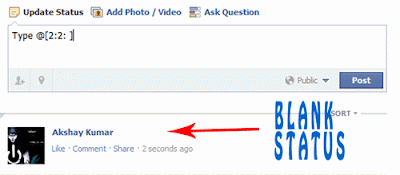
Paste blank Status on Facebook


       Today i will show you how to publish single line or multiple line blank status on facebook. You can also use this method in facebook comments. So lets get started.

How To Hack Saved Password In Firefox ?


firefox hacks
 In this post i will share with you guys how to view saved password in Mozilla Firefox web browser. This trick can be helpfull if you get your hands on someone computer maybe your friends and he has saved password for certain websites like gmail, facebook,yahoo etc then you can easily view his password with very simple and easy trick that i am going to share today. 

For demonstration purpose i have already saved a fake email password for facebook. But it will work on any website. So lets get started.

How to do ?